Protect a PDF with a password
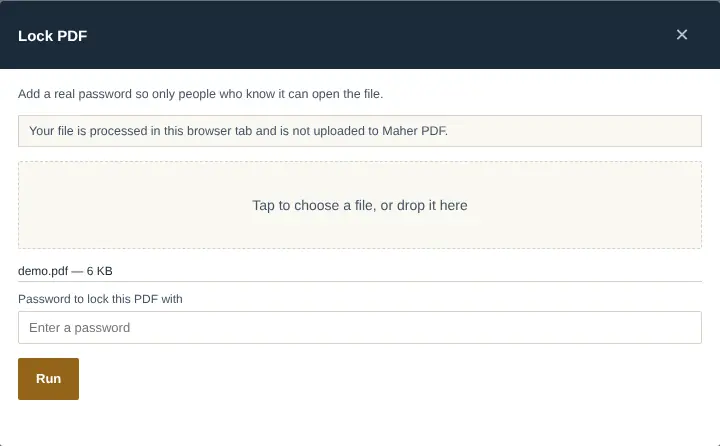
Protect PDF (shown as Lock PDF in the tool list) encrypts a document so it can only be opened by someone who knows the password. On this site it uses AES-256, the strongest encryption method in the PDF standard, and it is supported by all modern PDF readers.
Your files are processed inside this browser tab and are not uploaded to Maher PDF. Please read the Privacy Policy before working with sensitive documents.
This is real encryption, not a cosmetic lock: without the password, the contents of the file can't be read. That also means there is no way to recover the file if you forget the password, so store it somewhere safe.
How to use Protect PDF
- Tap Choose a PDF to protect and pick the file.
- Type a password into the password field. Use something long and hard to guess.
- Tap Run. A new file ending in
_locked.pdfdownloads. - Open it once to confirm the password works before you send it.
Key features
- AES-256 encryption on secure (HTTPS) connections.
- Password and file never leave your browser.
- Compatible with Adobe Acrobat, browser viewers, and phone PDF apps.
When to protect a PDF
Password protection makes sense for documents that would cause harm if they reached the wrong person: priced quotations and BOQs, payment applications, salary and HR documents, ID copies, contracts under negotiation, and medical or personal records. Email is often forwarded, auto-filed and backed up in places you don't control; a password keeps the content closed even if the attachment travels further than intended.
Worked example: sending a priced BOQ to a client
- Open Protect PDF and choose the BOQ.
- Type a strong password: at least 10 characters, mixing words and numbers, for example
Habshan-Gatch-2026. Avoid the project name alone or your company name. - Tap Run and save the locked copy.
- Email the PDF, and send the password separately by phone call, SMS or WhatsApp. Never in the same email.
How strong is the protection?
Maher PDF encrypts the whole document with AES-256, the standard used by banks. Without the password, the pages can't be opened or read. The weak point is always the password itself: short or guessable passwords can be cracked by trying millions of combinations. Long passphrases are both strong and easy to share by phone.
Keep an unlocked copy of your own files in a safe place. If a password is lost, no tool can recover the content of a properly encrypted PDF.
Supported files
Input: one PDF. Output: an encrypted PDF that requires the password to open.
Privacy and security
Encryption happens in this tab. Maher PDF never receives or stores your password, which is exactly why it can't help you recover it.
Common problems
- I forgot the password.
- It can't be recovered or reset. If you still have the unprotected original, protect it again with a new password.
- The recipient can't open the file.
- Make sure they are typing the password exactly, including capital letters. Very old PDF readers may not support AES-256; ask them to use a current reader or browser.
Tips
- Send the password through a different channel than the file, for example the file by email and the password by phone or text.
- Learn more in the PDF security guide.
Frequently asked questions
How strong is the encryption?
On this site the tool uses AES-256, the strongest method defined for PDF. Real-world security also depends on choosing a long, unpredictable password.
Can you recover my password?
No. The password never reaches Maher PDF, so nobody here can see or reset it.
Does protecting a PDF stop copying or printing?
This tool sets an open password. Anyone who has the password can open the file and do what their PDF reader allows.
Can I remove the password later?
Yes. Use Unlock PDF with the password to save an unprotected copy.
Will the recipient need special software?
No. Every PDF reader, including phone browsers, Adobe Reader and Microsoft Edge, asks for the password and then opens the file normally.
Guides: Merge, organize, compress and protect
This tool is part of Merge, organize, compress and protect. See also merge PDF files.
- How to Remove One Page (or Several) From a PDF on Phone or ComputerDelete one page, a range or all the blank pages, on any phone or computer, without uploading the file.
- How to Rearrange or Reorder PDF Pages (Drag and Drop, No App)Move pages, fix a scan that came out in the wrong order, rotate and delete in one pass, on any device.
- How to Merge PDF Files (and Get the Page Order Right)Prepare your files, set the order, fix sideways pages, and keep the result small enough to email.
- Why Is My PDF So Big? A Practical Guide to PDF File SizeWhat makes PDFs large, what you can realistically shrink, and when compressing is the wrong choice.