How to Turn Notes, Messages and Text Files Into a Clean PDF
A lot of real work starts as plain text: site notes in a phone's notes app, a list agreed in a WhatsApp group, instructions in an email, a log exported as a .txt file. When it has to be filed, printed or attached to a report, it needs to be a PDF. Opening Word just to paste and save is slow on a phone and often unavailable. Text to PDF does it in one step.
The basic routine
- Copy your text from wherever it is.
- Open Text to PDF and paste it into the box, or tap Open a .txt file.
- Add a title, choose font and size, and tap Create PDF.
The text in the PDF is real text with an embedded font, so it can be searched and copied like any document produced in Word.
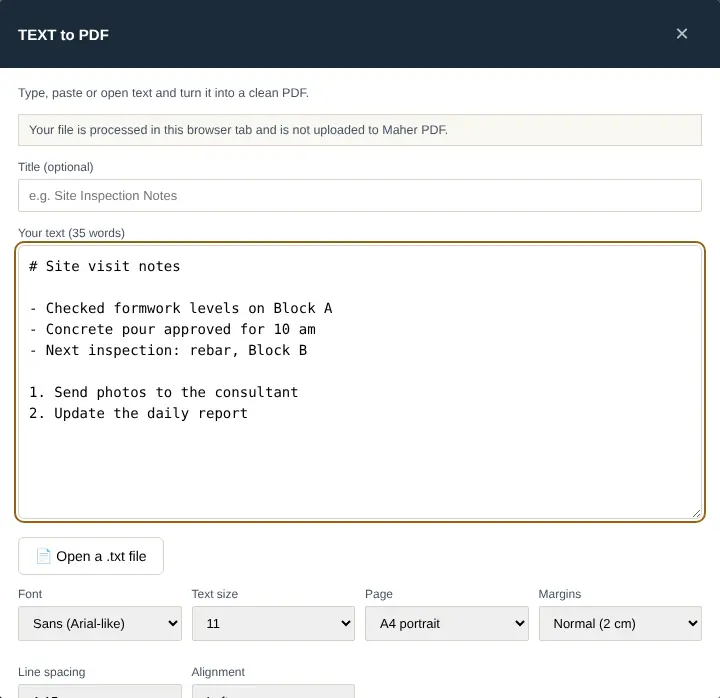
Add structure with three simple marks
You don't need a formatting toolbar. Start a line with:
#and a space for a main heading,##for a section,###for a sub-section;-or*and a space for a bullet point;1.for a numbered item.
Leave an empty line between paragraphs. That's enough to turn a block of notes into a readable document.
Example: from WhatsApp to a daily report
Suppose the foreman sent this in the group:
Progress today
- Subgrade prep CH 2+100 to 2+350 done
- 3 FDT tests passed, 1 retest tomorrow
- Water tanker delayed 2 hrs
Paste it, change the first line to # Daily Report – 24 October, add ## Progress and ## Issues where they belong, and tick Add page numbers. The PDF has a bold title, sections and bullets, ready to attach.
Choosing the settings
| Document | Font | Size | Alignment |
|---|---|---|---|
| Letters and formal notes | Serif | 11–12 | Justified |
| Reports and minutes | Sans | 11 | Left |
| Logs, code, column lists | Monospace | 9–10 | Left |
Monospace keeps every character the same width, so columns you lined up with spaces stay aligned.
Arabic, Urdu and other languages
Text in Arabic, Urdu and other non-Latin scripts is laid out by your browser, which shapes the letters and orders right-to-left text correctly. Those pages are stored as images, so they look right but the text can't be selected. English text in the same document still displays perfectly.
Your draft is kept
The text you type is saved as a draft on your device only, so a phone call or a closed tab doesn't lose your work. Nothing is uploaded.
Related guides
- Word to PDF: Why Pages Break Differently and How to Prevent ItStop lines jumping pages, lonely headings and blank last pages when you save Word as PDF.
- How to Convert PowerPoint (PPTX) to PDF Without Losing LayoutPPTX to PDF on any device: keeping fonts and layout, handouts with notes, and fixing missing charts or big files.