Convert text to PDF
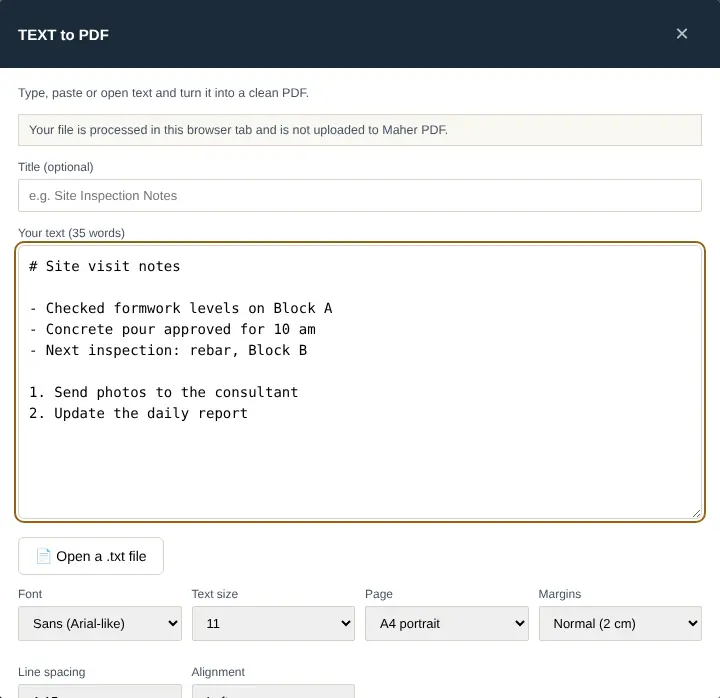
Text to PDF turns plain text into a tidy PDF document in seconds. Type or paste your text, or open a .txt file, choose a font and page size, and download a PDF that looks the same on every device.
Your files are processed inside this browser tab and are not uploaded to Maher PDF. Please read the Privacy Policy before working with sensitive documents.
It is ideal for notes, letters, minutes, instructions, lists and logs that start life in a chat, an email or a notes app. Lines starting with # become headings, lines starting with - or 1. become lists, and the text in the PDF is real text that can be searched and copied.
How to use Text to PDF
- Tap Write text.
- Type or paste your text into the box, or tap Open a .txt file. Add a title if you want one at the top of the first page.
- Choose the font, text size, page size, margins, line spacing and alignment. Tick Add page numbers for longer documents.
- Tap Create PDF, then Download.
Key features
- Real, selectable and searchable text with embedded fonts.
- Simple formatting:
#,##,###headings, bullet and numbered lists. - Sans, serif and monospace fonts; sizes from 9 to 18 points.
- A4 or Letter, portrait or landscape; three margin widths; four line spacings.
- Left, justified or centred text, optional title and page numbers.
- Your text is kept as a draft on this device until you clear it.
- Arabic, Urdu and other scripts are laid out right to left and shaped correctly.
Worked example: site notes from WhatsApp to a PDF report
- Copy your notes from WhatsApp or your notes app.
- Open Text to PDF and paste them in. Add a line
# Daily Site Report – 24 Octoberat the top, and start each item with-to make a bullet list. - Choose Sans, size 11, A4 portrait, and tick Add page numbers.
- Tap Create PDF and attach it to your email.
Formatting cheat sheet
| Type at the start of a line | Result |
|---|---|
# Title | Large bold heading |
## Section | Medium bold heading |
### Sub-section | Small bold heading |
- item or * item | Bullet point |
1. item | Numbered item (the number is kept as you type it) |
| Empty line | Space between paragraphs |
Headings are kept together with the text below them, so a heading never sits alone at the bottom of a page.
Supported files
Input: text typed or pasted into the page, or a plain-text file (.txt, .md, .csv, .log) up to 5 MB. Output: a PDF. English and other Latin-script text is stored as real text. Text in Arabic, Urdu, Hindi, Chinese and other scripts is laid out by your browser so it displays correctly, and those pages are stored as images.
Privacy and security
Your text never leaves your device. The PDF is created in this browser tab, and the draft is saved only in this browser's own storage so you don't lose it if you close the page.
Common problems
- My line breaks changed.
- Each line you type stays a separate line. Long lines wrap at the page margin; to start a new paragraph with a gap, leave an empty line.
- A line starting with a number became a list.
- Untick Turn lines starting with #, - or 1. into headings and lists to keep every line exactly as typed.
- Arabic text can't be selected in the PDF.
- Text in non-Latin scripts is placed as page images so it is shaped and ordered correctly. It looks right but can't be copied.
Tips
- Paste text from WhatsApp, email or notes apps directly; formatting characters are cleaned automatically.
- Use the monospace font for logs, code and tables made with spaces, so columns stay aligned.
- Choose Justified alignment for letters and reports; keep Left for notes and lists.
Frequently asked questions
Is the text in the PDF searchable?
Yes, for English and other Latin-script languages. The text is embedded with a real font, so you can search, select and copy it.
Can I make headings bold?
Yes. Start a line with # and a space for a large heading, ## for a medium one and ### for a small one. Headings are bold automatically.
Is there a length limit?
No fixed limit. Very long texts (hundreds of pages) take longer on a phone.
Does it work offline?
Yes, once the page has been opened while online. The tool and fonts are stored on your device.
Guides: Create PDFs from Office files and text
This tool is part of Create PDFs from Office files and text. See also convert Word to PDF.
Compare every conversion option on the PDF converter page.
- Word to PDF: Why Pages Break Differently and How to Prevent ItStop lines jumping pages, lonely headings and blank last pages when you save Word as PDF.
- How to Convert PowerPoint (PPTX) to PDF Without Losing LayoutPPTX to PDF on any device: keeping fonts and layout, handouts with notes, and fixing missing charts or big files.
- How to Turn Notes, Messages and Text Files Into a Clean PDFFrom WhatsApp, email or notes app to a tidy PDF with headings and lists, without Word.