How to Make a Scanned PDF Searchable and Editable (OCR Explained)
You search a 40-page report for "compaction" and nothing comes up, even though you can see the word on page 12. You try to copy a paragraph and get nothing, or the whole page selects as one block. The PDF is a scan: every page is a photograph of paper. To search, copy or edit it, the text has to be recognised first. That process is called OCR, optical character recognition.
Part of our Scanning and OCR guides. Tool used here: Scan to PDF.
Digital PDF or scanned PDF?
A digital PDF, exported from Word, Excel or a design program, stores letters as letters. A scanned PDF stores a picture of each page. They can look identical on screen. The quick test: try to select a single word. If you can, it is digital. If you can't, or if a rectangle covering the whole page is selected, it is a scan.
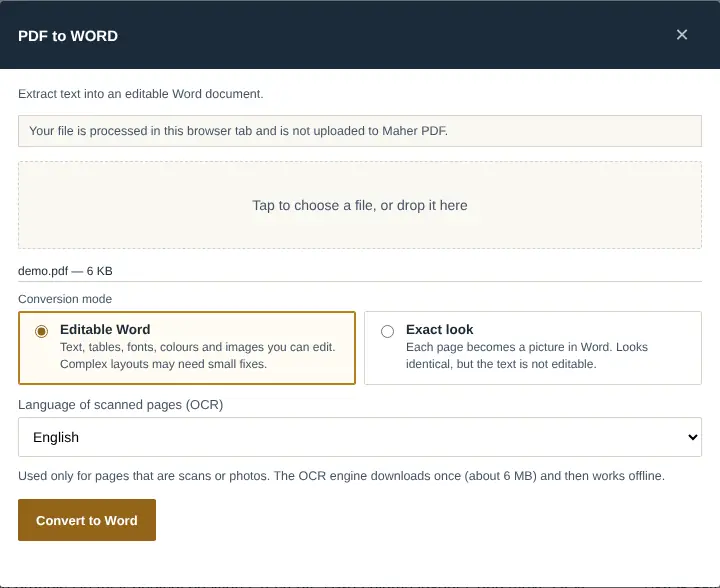
What OCR does
OCR software looks at the picture of each page, finds the lines and words, and works out which letters they are. The good engines today use neural networks trained on millions of pages, and on a clean scan they are very accurate. On a poor scan they guess, and some guesses are wrong.
In Maher PDF, OCR runs on your own device. The recognition engine (about 6 MB for English, less for Arabic) downloads once from maherpdf.com and then works offline. Your document is never uploaded.
Three ways to use OCR in Maher PDF
| You want to | Use |
|---|---|
| Edit the whole document as text | PDF to Word — scanned pages are read automatically |
| Get a table of numbers into a spreadsheet | PDF to Excel — table lines are detected, each cell read separately |
| Change a few words on a scanned page | Edit PDF — tap OCR, then edit the words it found |
Getting the best accuracy
OCR accuracy depends far more on the scan than on the software. In order of importance:
- Resolution. 200–300 dpi for normal text. Below 150 dpi, small print turns into guesses.
- Straight pages. Slight tilts are corrected automatically; strongly skewed phone photos are not. Use Scan to PDF, which straightens pages before they become a PDF.
- Contrast. Black text on white paper. Faint photocopies, coloured paper and shadows reduce accuracy.
- Clean text. Stamps, signatures and handwriting over printed text confuse the engine. Handwriting itself is read poorly by all general OCR engines.
- The right language. Choose English, Arabic, or English + Arabic for bilingual documents. Reading Arabic text with an English-only engine produces nonsense.
Reading the confidence report
After a conversion that used OCR, the result card shows the average confidence for each scanned page and how many words were uncertain. Treat that as a checklist: a page at 95% is very likely right; a page at 65% needs careful proofreading. Always check numbers, names, dates and reference codes, because a single wrong digit in a quantity or a drawing number matters more than a typo in a sentence.
Common OCR mistakes to look for
- Letter O and digit 0, letter l and digit 1, S and 5, B and 8.
- Decimal points read as commas, or a space inside a number ("2694 310.148").
- Table lines read as the letter I or the character |.
- Logos and icons read as random letters.
Maher PDF's table reader re-checks numbers against the rest of their column and re-reads cells that don't fit, which removes many of these errors, but a final human check is still the rule for anything contractual.
Summary
Scanned pages are pictures until OCR turns them into text. Scan straight, sharp and in good light; pick the right language; then convert to Word or Excel, or edit in place. Proofread the numbers, and the result is as useful as the original digital file.
Related guides
- How to Scan Documents to PDF with Your Phone (No App Needed)Lighting, angle, and background tips for clean scans, plus combining pages and keeping file size down.
- How to Scan Receipts for Expense Claims on Your PhoneOne clean, readable PDF of all your receipts for the monthly expense claim.
- Arabic and English OCR: How to Get Better Results From Scanned DocumentsLanguage choice, scan quality and bilingual layouts: getting usable text from Arabic and English scans.